A ledger of what happened, told back in words.
Your applications push machine events — USER_LOGIN, TICKET_CLOSED, CPU_LOAD. memento keeps them as an immutable, tenant-isolated ledger and serves them back per entity, per actor, as a feed or a live stream, each one rendered as a sentence in the reader's language.
docker compose -f docker-compose.yaml up -dPOST /memento/events
{"event_type": "USER_LOGIN",
"instance_type": "user", "instance_id": 42,
"actor_id": "igor"}- en
- User igor logged in.
- sr
- Korisnik igor se prijavio.
One event, every way to read it
An application says what happened, once. memento stores it as an immutable row of its tenant and hands it back however the reader asks: as one object's history, as a sentence in the reader's language, through a query, or the moment it happens. Real requests to the stage service; ids shortened.
POST /memento/events the application sends
{ "event_type": "USER_LOGIN", "instance_type": "user", "instance_id": 42, "actor_id": "igor", "payload": { "method": "password", "client": "web" }}201 Created memento stores and renders it
{ "ok": true, "data": { "id": "0cba06fc…", "occurred_at": "2026-11-02T00:41:20.166Z", "received_at": "2026-11-02T00:41:20.169Z", "event_type": "USER_LOGIN", "instance_type": "user", "instance_id": "42", "actor_id": "igor", "payload": { "client": "web", "method": "password" }, "rendered": "User igor logged in.", "rendered_locale": "en", "archived_at": null, "api_key_id": "44cebcf6…" }}GET /memento/entities/user/42/events what happened to user 42
{ "ok": true, "data": [ { "id": "0cba06fc…", "occurred_at": "2026-11-02T00:41:20.166Z", "received_at": "2026-11-02T00:41:20.169Z", "event_type": "USER_LOGIN", "instance_type": "user", "instance_id": "42", "actor_id": "igor", "payload": { "client": "web", "method": "password" }, "rendered": "User igor logged in.", "rendered_locale": "en", "archived_at": null, "api_key_id": "44cebcf6…" } ], "meta": { "limit": 1, "count": 1, "next_cursor": "WyIyMDI2LTExLTAyVDAwOjQxOjIwLjE2NloiLCIwY2JhMDZmYy1kM2VhLTQ5ODItYTVlMi02Zjg4ZWM2N2Q0YTIiXQ" }}- en
- User igor logged in.
- GET /memento/entities/user/42/events?limit=1
- sr
- Korisnik igor se prijavio.
- GET /memento/entities/user/42/events?limit=1&locale=sr
The sentence comes from the event type's Handlebars template in the asked locale (USER_LOGIN.sr.hbs), rendered per request: the stored event is the same.
GET /memento/entities/user/42/events?limit=1&locale=sr
{ "ok": true, "data": [ { "id": "0cba06fc…", "occurred_at": "2026-11-02T00:41:20.166Z", "received_at": "2026-11-02T00:41:20.169Z", "event_type": "USER_LOGIN", "instance_type": "user", "instance_id": "42", "actor_id": "igor", "payload": { "client": "web", "method": "password" }, "rendered": "Korisnik igor se prijavio.", "rendered_locale": "sr", "archived_at": null, "api_key_id": "44cebcf6…" } ], "meta": { "limit": 1, "count": 1, "next_cursor": "WyIyMDI2LTExLTAyVDAwOjQxOjIwLjE2NloiLCIwY2JhMDZmYy1kM2VhLTQ5ODItYTVlMi02Zjg4ZWM2N2Q0YTIiXQ" }}POST /memento/events/query and / or / not over the fields
{ "filter": { "and": [ { "field": "instance_type", "op": "eq", "value": "user" }, { "field": "event_type", "op": "in", "value": ["USER_LOGIN", "USER_LOGOUT"] }, { "field": "actor_id", "op": "eq", "value": "igor" } ] }, "limit": 2}200 OK
{ "ok": true, "data": [ { "id": "0cba06fc…", "occurred_at": "2026-11-02T00:41:20.166Z", "received_at": "2026-11-02T00:41:20.169Z", "event_type": "USER_LOGIN", "instance_type": "user", "instance_id": "42", "actor_id": "igor", "payload": { "client": "web", "method": "password" }, "rendered": "User igor logged in.", "rendered_locale": "en", "archived_at": null, "api_key_id": "44cebcf6…" }, { "id": "97cc15de…", "occurred_at": "2026-11-02T00:35:25.752Z", "received_at": "2026-11-02T00:35:25.755Z", "event_type": "USER_LOGIN", "instance_type": "user", "instance_id": "42", "actor_id": "igor", "payload": { "client": "web", "method": "password" }, "rendered": "User igor logged in.", "rendered_locale": "en", "archived_at": null, "api_key_id": "44cebcf6…" } ], "meta": { "limit": 2, "count": 2, "next_cursor": "WyIyMDI2LTExLTAyVDAwOjM1OjI1Ljc1MloiLCI5N2NjMTVkZS1lYjRmLTQ5Y2ItYWMzZC01YzRkODhiNjc0NDQiXQ" }}GET /memento/ws?instance_type=user&instance_id=42WebSocket, the key as subprotocol
← memento.welcome
{ "kind": "memento.welcome", "payload": { "protocol_version": "1", "tenant": "t-4uvljqyl", "filter": { "instance_type": "user", "instance_id": "42" }, "heartbeat_interval_ms": 30000, "max_buffered_messages": 1000 }}← memento.event.new
{ "kind": "memento.event.new", "id": "0cba06fc…", "payload": { "id": "0cba06fc…", "occurred_at": "2026-11-02T00:41:20.166Z", "received_at": "2026-11-02T00:41:20.169Z", "event_type": "USER_LOGIN", "instance_type": "user", "instance_id": "42", "actor_id": "igor", "payload": { "client": "web", "method": "password" }, "rendered": "User igor logged in.", "rendered_locale": "en", "archived_at": null, "api_key_id": "44cebcf6…" }}The examples, live
Real screenshots of the examples site: eight pages over one tenant that a CPU monitor and a ticket desk simulator keep writing to. Every list on them is a UDC collection; every page follows the live stream.
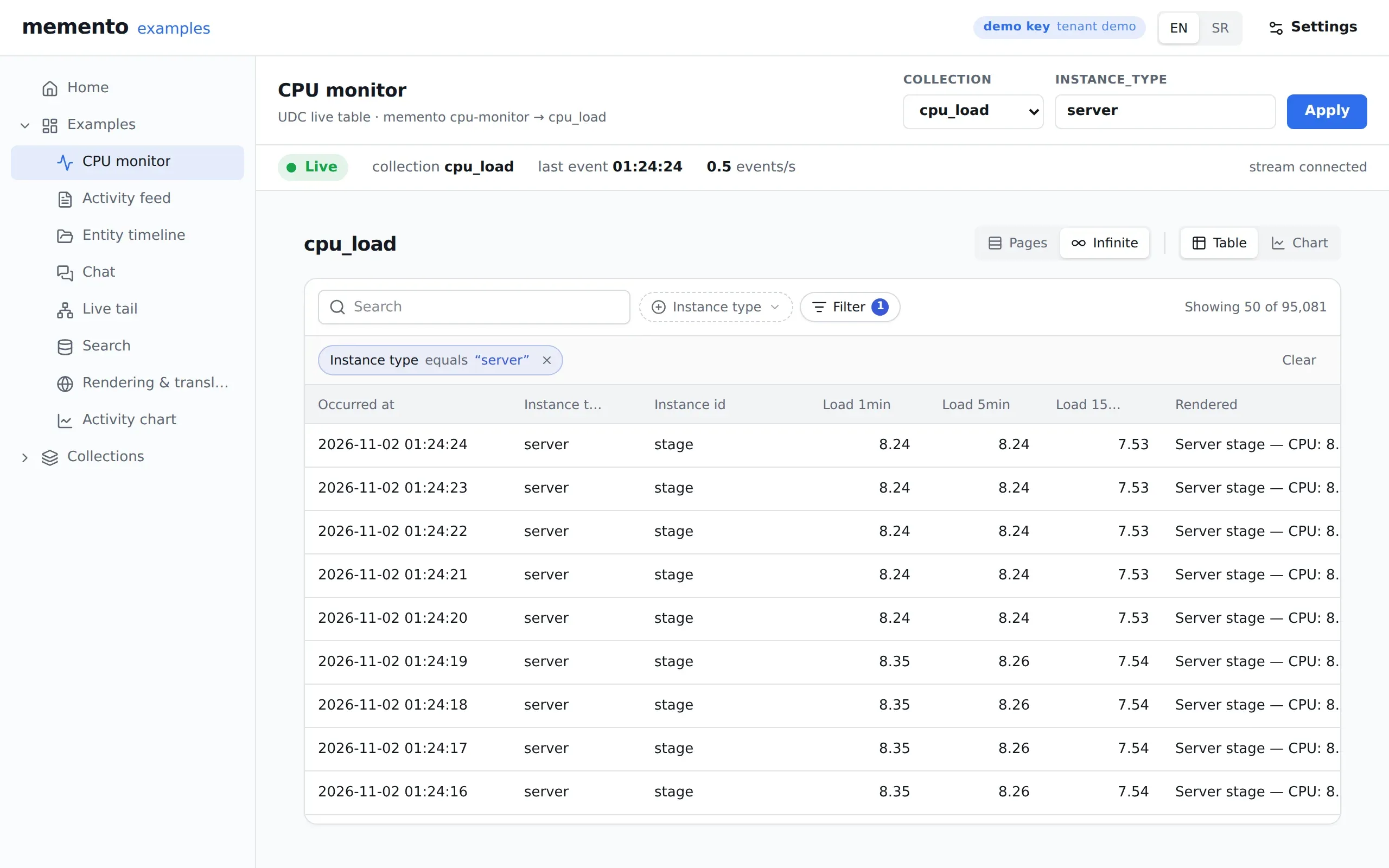
CPU monitor/examples/cpu-monitor
The CLI pushes this machine's load every second; the cpu_load UDC collection draws it as a live table and chart.
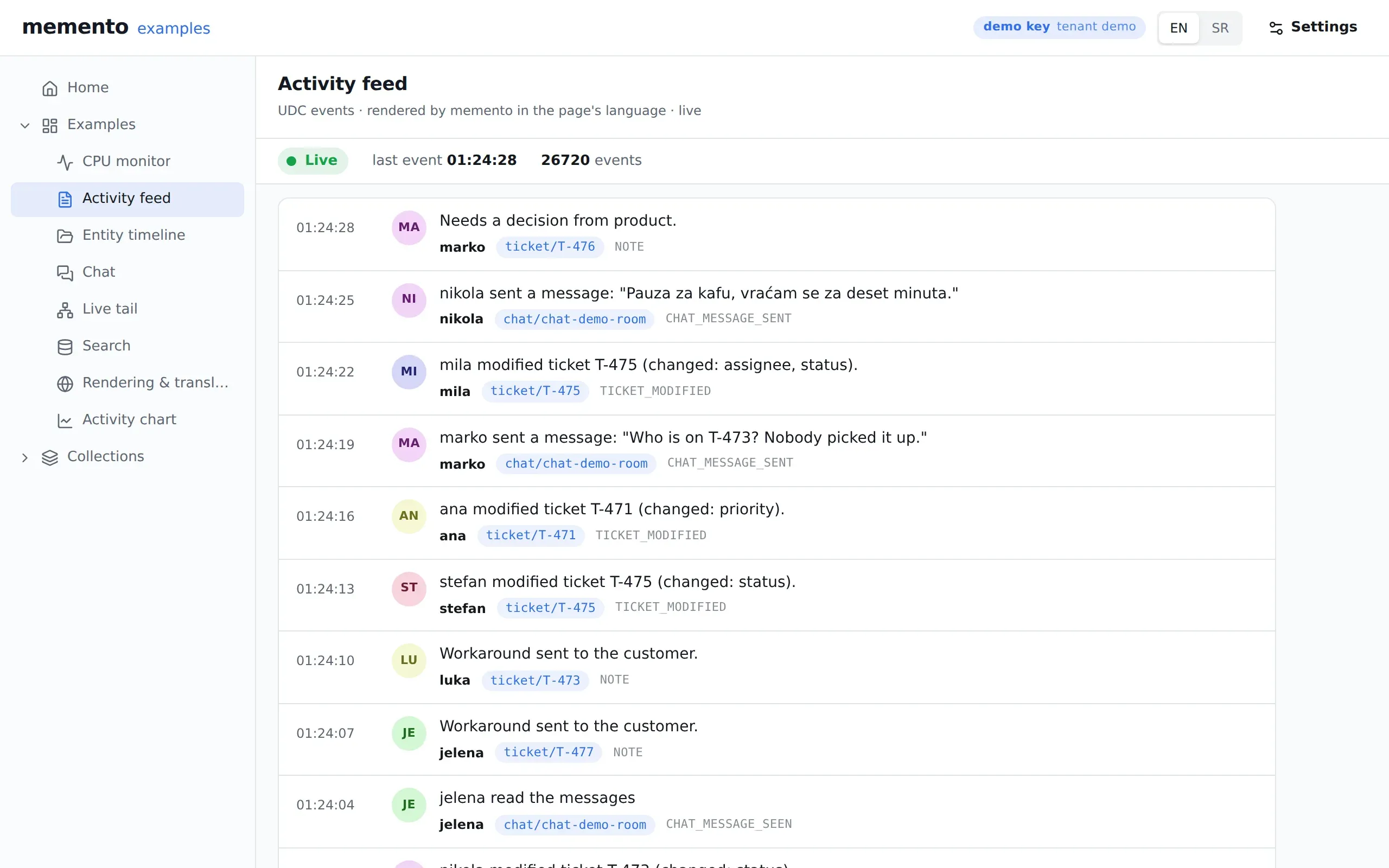
Activity feed/examples/activity
Every event of the tenant as the sentence memento rendered, newest on top, in the header's language.
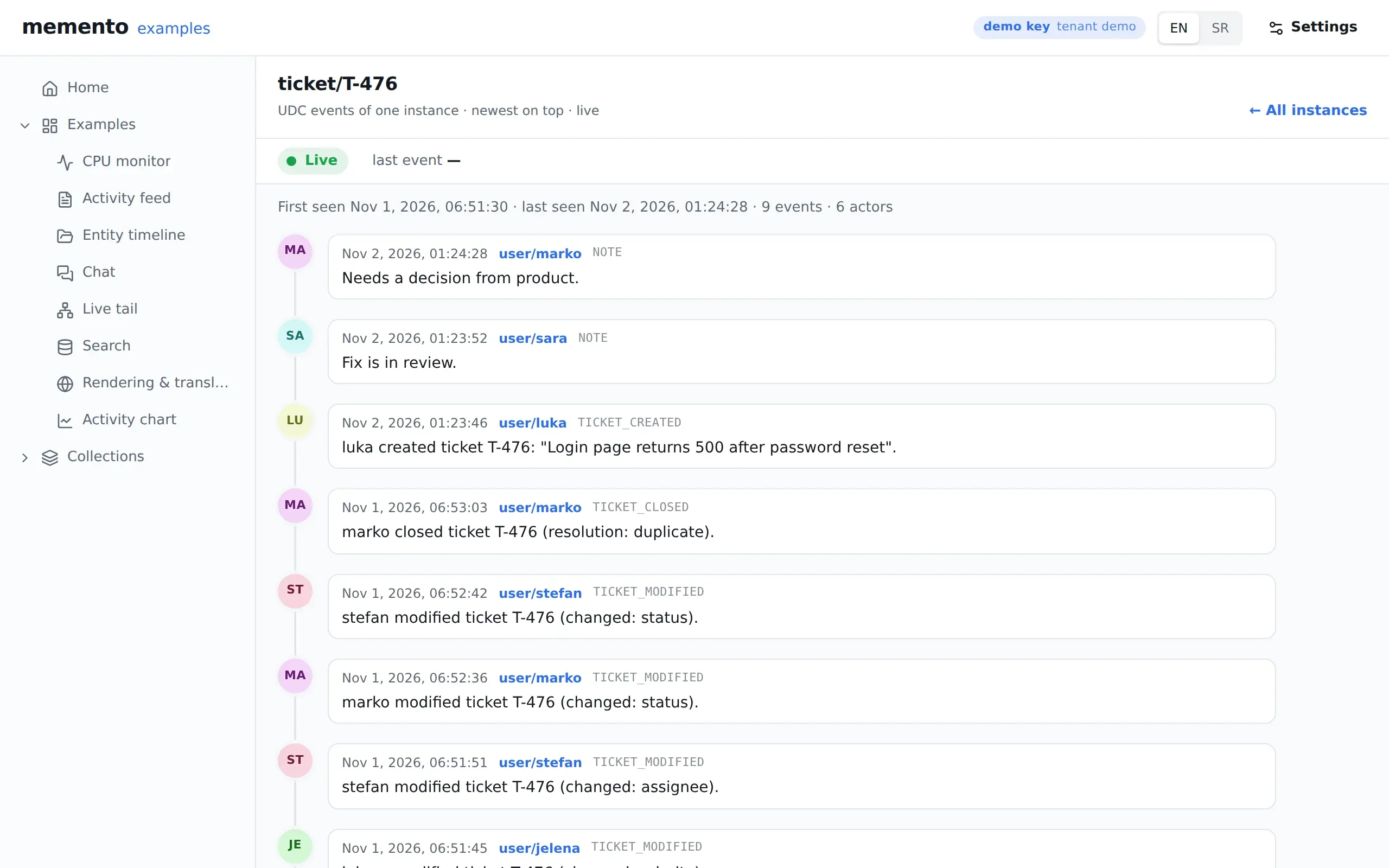
Entity timeline/examples/entity
What happened to one ticket: its create, modify, note and close story, read through UDC, live.
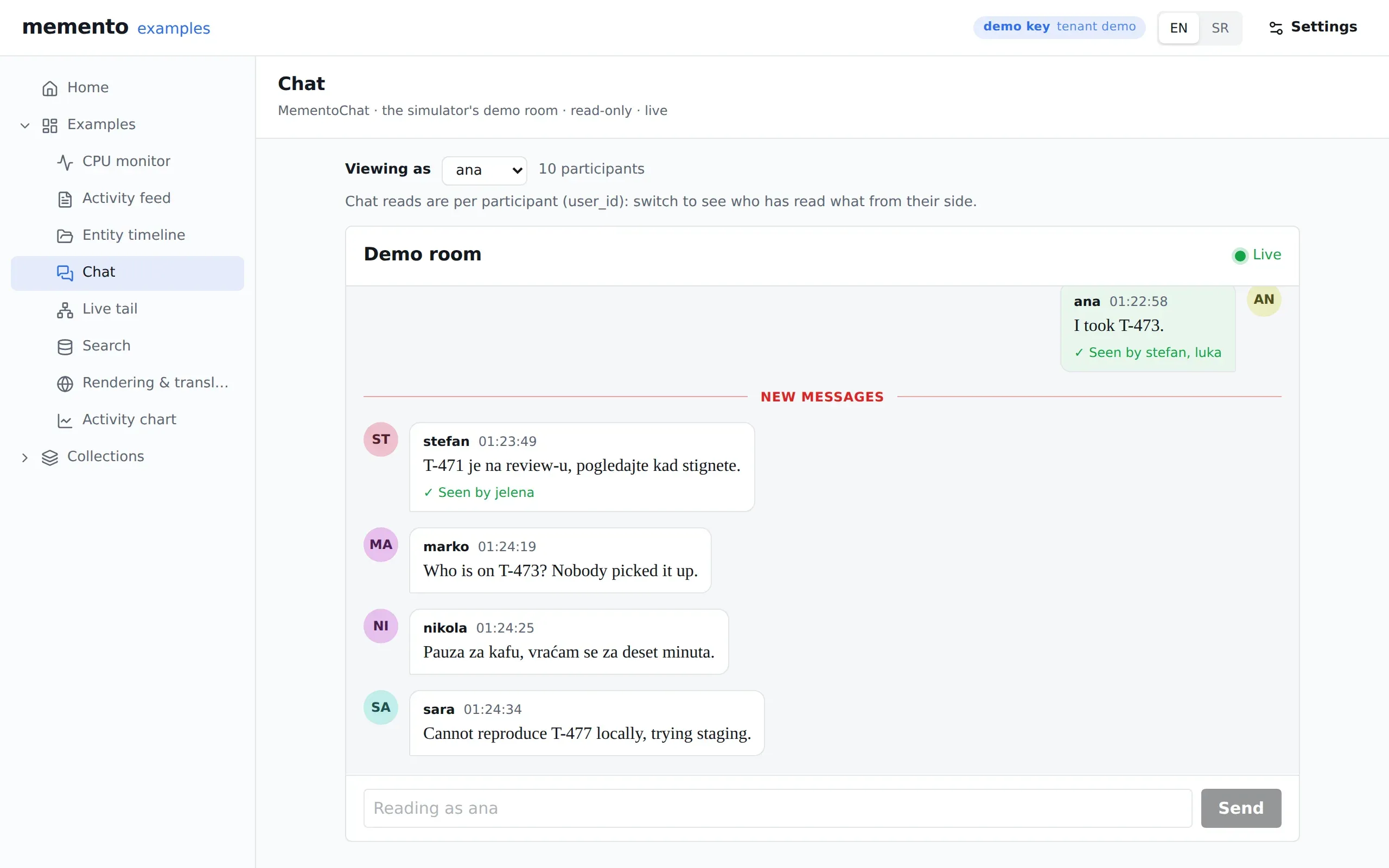
Chat/examples/chat
The simulator's demo room in MementoChat, seen as one participant, with who has read what.
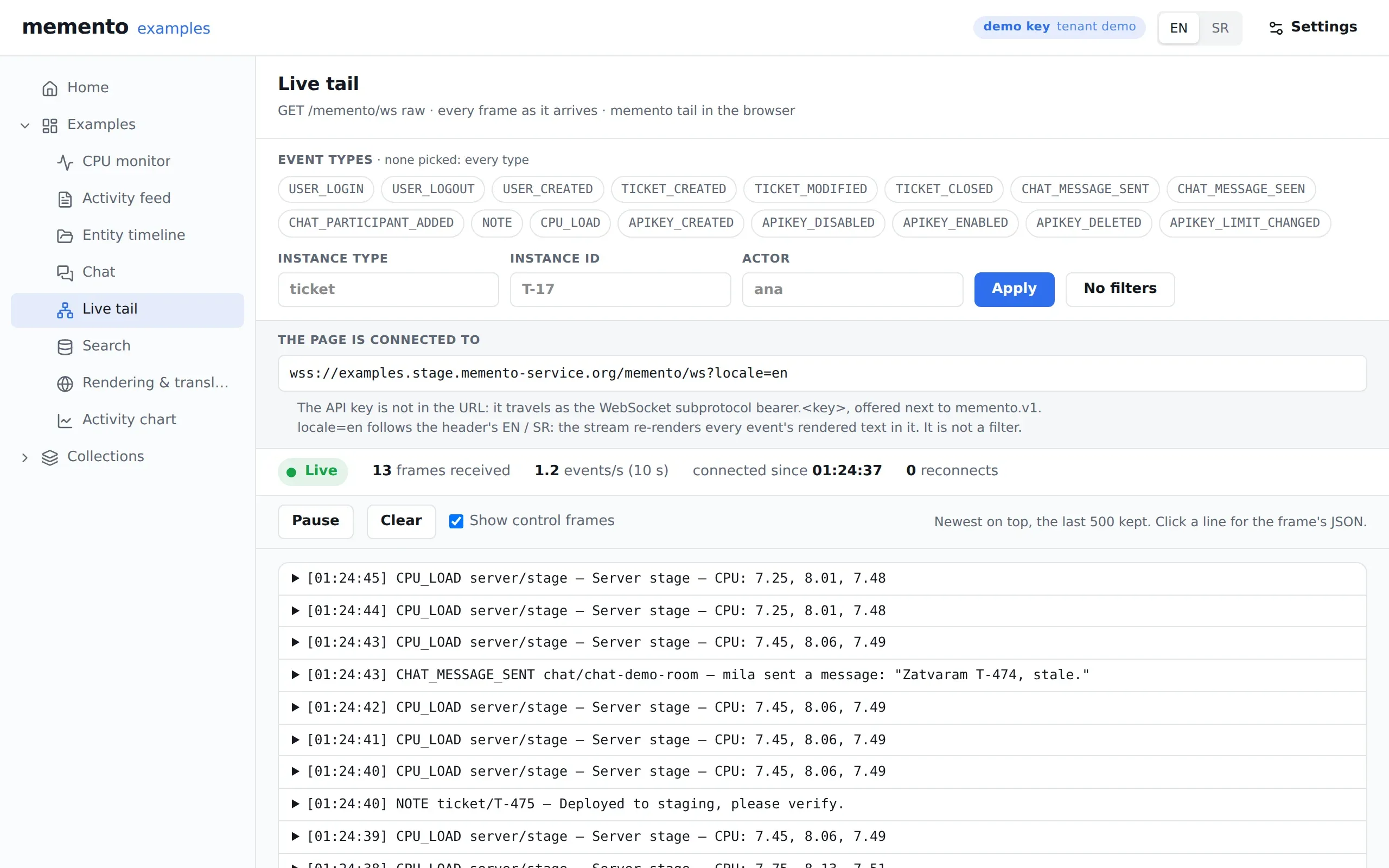
Live tail/examples/tail
Every frame of /memento/ws as it arrives, with the stream's filters in the URL: memento tail in the browser.
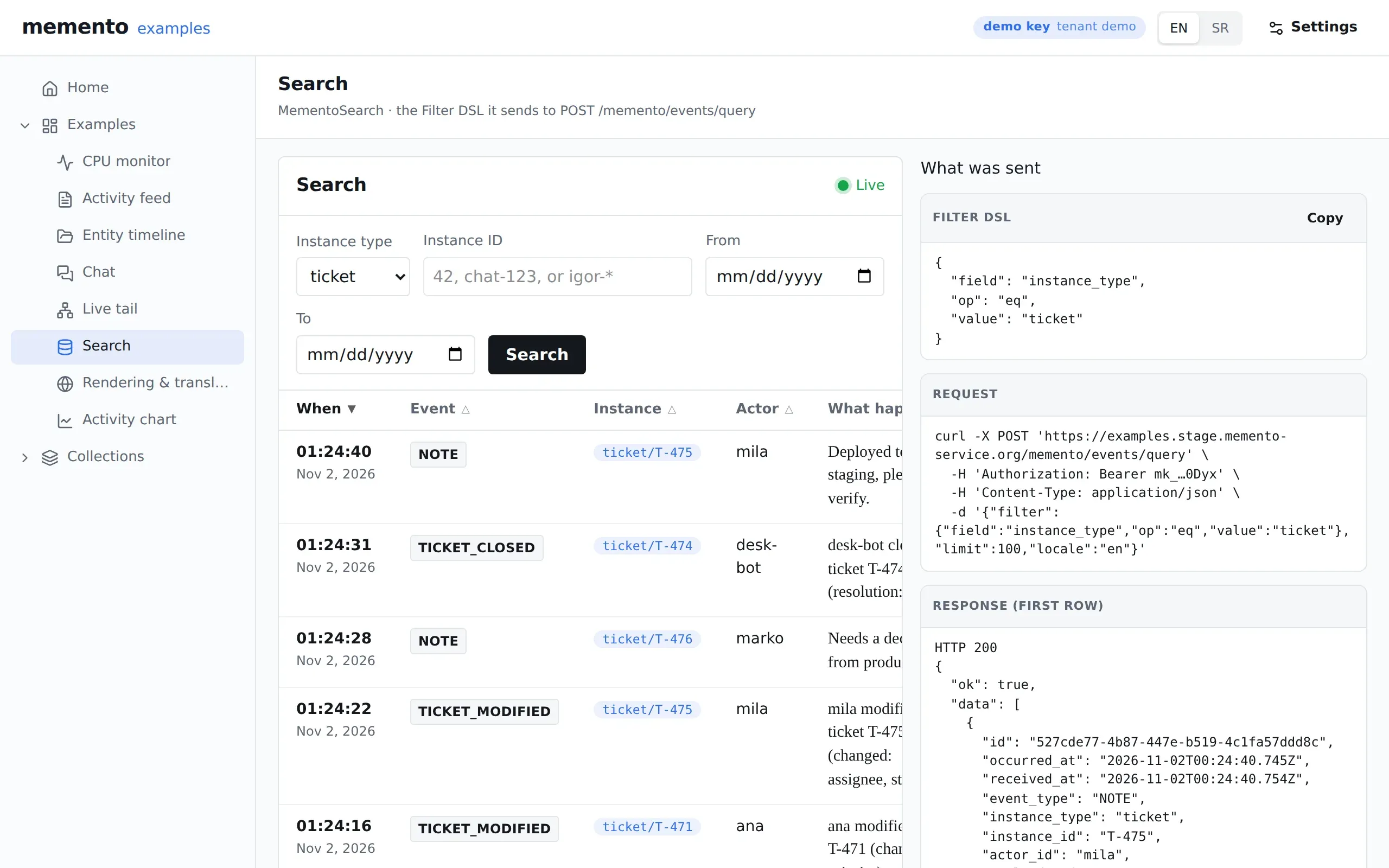
Search/examples/search
MementoSearch next to the Filter DSL JSON it sends to POST /events/query, and the request as curl.
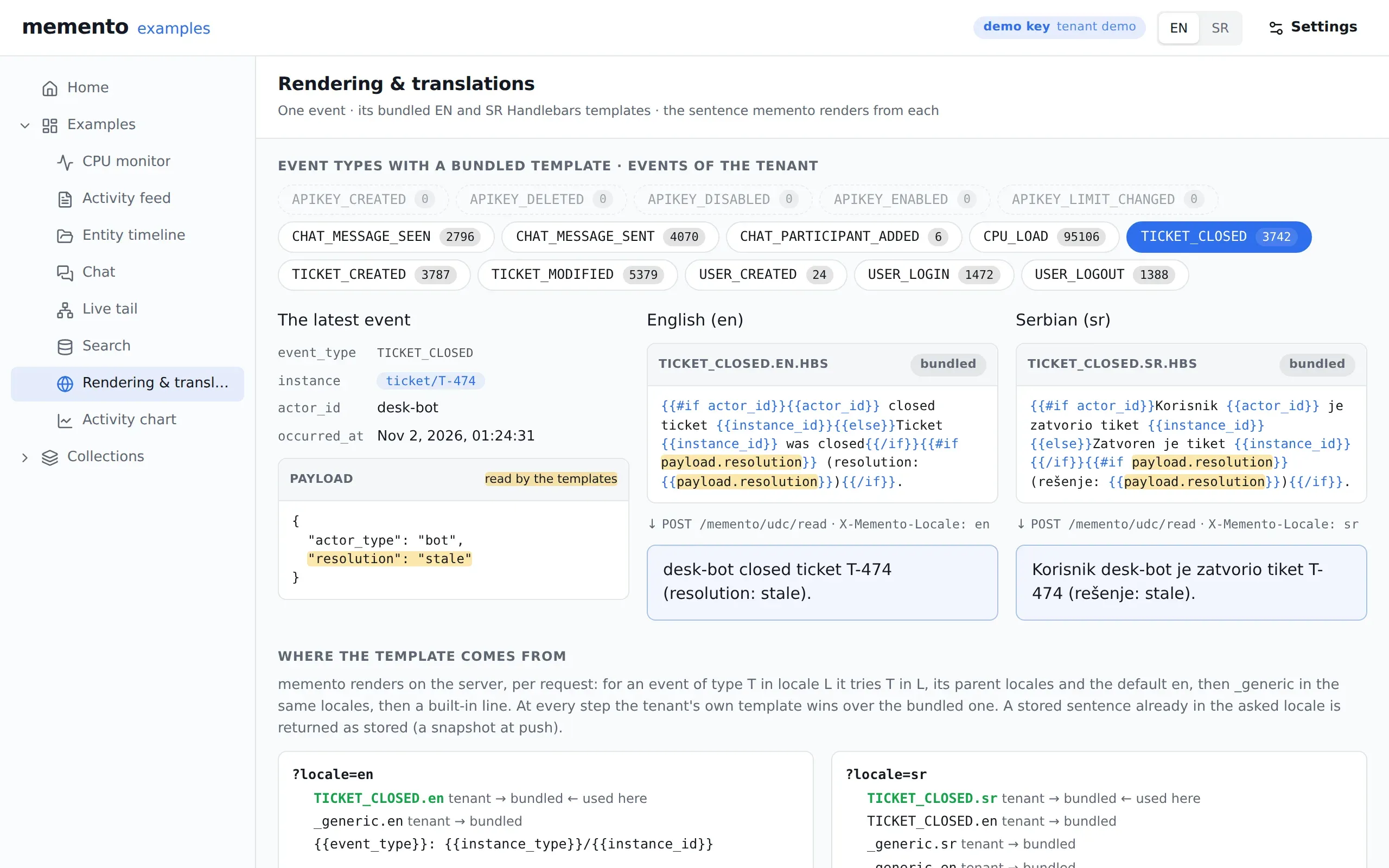
Rendering & translations/examples/rendering
One event, its bundled EN and SR templates, and the sentence the server renders from each.
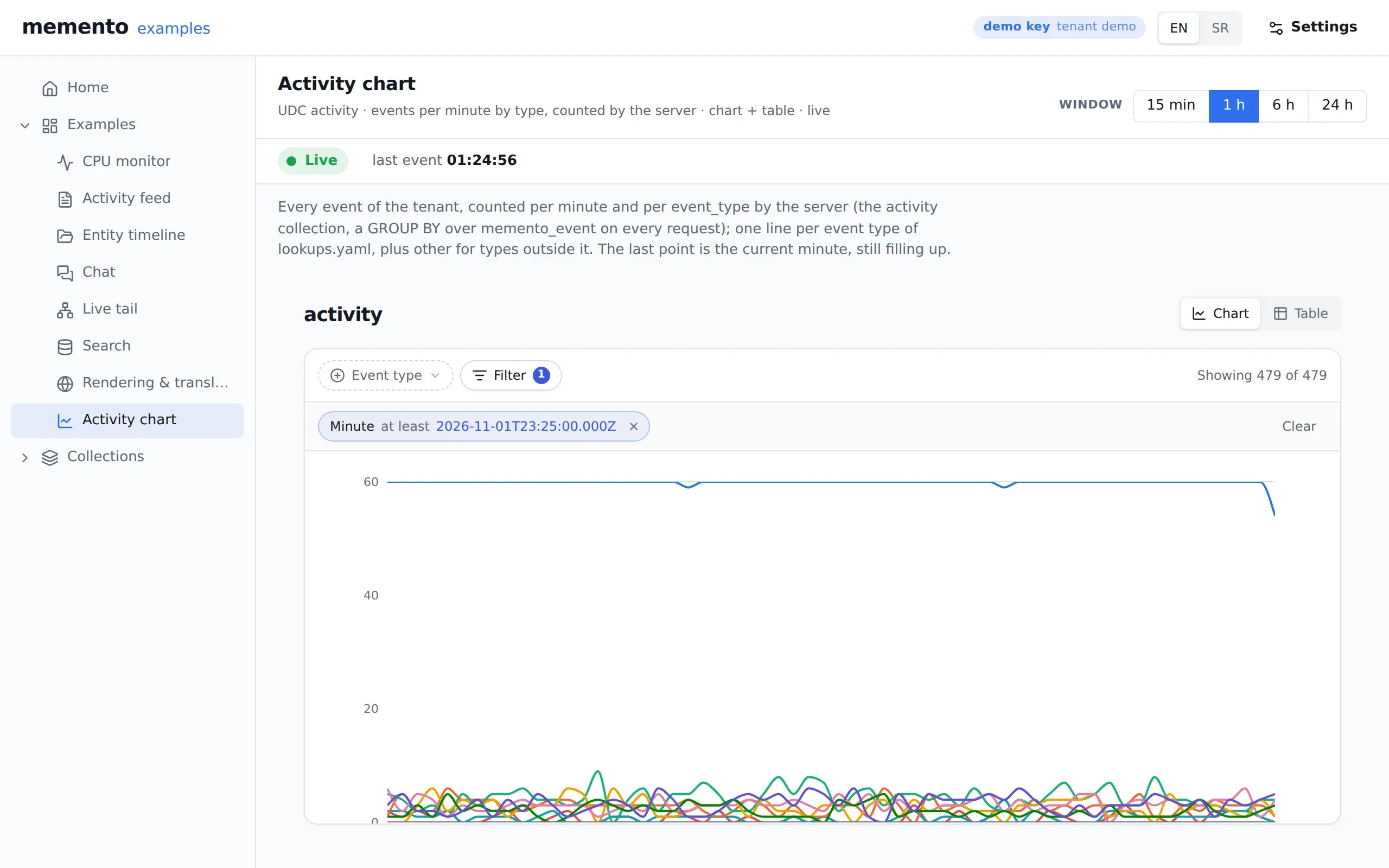
Activity chart/examples/chart
Events per minute by type, counted by the server (the activity collection), drawn by the chart renderer.
The API: JSON over HTTP, one key
Every answer is an envelope: {ok: true, data, meta} or{ok: false, error} with a code, a message and the details. A bearer API key belongs to one tenant and carries the scopes read andwrite; nothing in a request can name another tenant.
| /memento | scope | |
|---|---|---|
POST /events | write | push an event |
GET /events | read | list, newest first, cursor paging |
POST /events/query | read | list with the Filter DSL |
GET /entities/:type/:id/events | read | one object's history |
GET /describe | read | what this server offers the key |
GET /ws | read | the live stream (WebSocket) |
POST /udc/<action> | read | UDC collections: events, cpu_load, activity, menu |
… /chats… | read · write | chats: rooms, messages, who has read what |
GET /api/health | — | liveness, no key |
POST /memento/udc/list the list side, in the UDC protocol
{ "collection": "cpu_load", "filter": { "field": "instance_id", "op": "eq", "value": "stage" }, "sort": [{ "field": "occurred_at", "dir": "desc" }], "page": { "limit": 1 }}200 OK a UDC answer: its kind says ok or err
{ "kind": "udc.list.ok", "id": "", "payload": { "rows": [ { "__meta": { "id": "afc33f2d…", "version": 1 }, "occurred_at": "2026-11-02T00:41:19.588Z", "instance_type": "server", "instance_id": "stage", "load_1min": 6.9, "load_5min": 7.16, "load_15min": 7.86, "rendered": "Server stage — CPU: 6.9, 7.16, 7.86" } ], "next_cursor": null, "total": 95492 }}422 a push memento refuses
{ "ok": false, "error": { "code": "validation_error", "message": "invalid event", "details": [ { "origin": "string", "code": "invalid_format", "format": "regex", "pattern": "/^[A-Z][A-Z0-9_]*$/", "path": ["event_type"], "message": "event_type must be SCREAMING_SNAKE_CASE (e.g. USER_LOGIN)" } ] }, "request_id": "048b0b5e…"}Start where you are
Run your own memento in Docker or on one SQLite file, borrow ours with a key, put it inside the Fastify app you already have, or draw a tenant's events in React. Every command here has been run as written.
git clone https://github.com/digital-cube/jsmemento.git && cd jsmemento
# .env next to docker-compose.yaml: a database password, and the release to run# (:latest is the newest release, :main the newest commit)cat > .env <<'ENV'POSTGRES_PASSWORD=change-meMEMENTO_IMAGE=ghcr.io/digital-cube/jsmemento:1.1.0ENV
# memento with PostgreSQL 18 and Redis 7; --wait returns once their health checks passdocker compose -f docker-compose.yaml up -d --wait mementocurl localhost:3000/memento/api/health
# a tenant, and an API key of it with both scopes: the mk_… secret is printed this oncedocker compose -f docker-compose.yaml exec memento memento create-tenant acme --name "Acme Inc"docker compose -f docker-compose.yaml exec memento \  memento create-key --tenant acme --scopes read,write --name backend
export MEMENTO_API_KEY=mk_… # what create-key printedcurl -X POST localhost:3000/memento/events -H "Authorization: Bearer $MEMENTO_API_KEY" \ -H 'content-type: application/json' \ -d '{"event_type":"USER_LOGIN","instance_type":"user","instance_id":42,"actor_id":"igor"}'curl "localhost:3000/memento/entities/user/42/events?locale=sr" \ -H "Authorization: Bearer $MEMENTO_API_KEY" Container jsmemento-redis-1 Healthy Container jsmemento-postgres-1 Healthy Container jsmemento-memento-1 Healthy{"ok":true,"data":{"status":"ok"}}
created tenant acme (Acme Inc) id=40c1b5bc-0c20-40e2-b00a-b88dc9e3b4e5created key "backend" for acme [read,write]prefix: 27lho6hxkey: mk_27lho6hx_…Store it now: it cannot be shown again.
{"ok":true,"data":{"id":"ee41fd55-c7f5-4dfa-991e-b486e6591a4d","occurred_at":"2026-11-02T00:27:43.402Z","received_at":"2026-11-02T00:27:43.430Z","event_type":"USER_LOGIN","instance_type":"user","instance_id":"42","actor_id":"igor","payload":{},"rendered":"User igor logged in.","rendered_locale":"en","archived_at":null}}{"ok":true,"data":[{"id":"ee41fd55-c7f5-4dfa-991e-b486e6591a4d","occurred_at":"2026-11-02T00:27:43.402Z","received_at":"2026-11-02T00:27:43.430Z","event_type":"USER_LOGIN","instance_type":"user","instance_id":"42","actor_id":"igor","payload":{},"rendered":"Korisnik igor se prijavio.","rendered_locale":"sr","archived_at":null}],"meta":{"limit":50,"count":1,"next_cursor":null}}- Docker with Compose. The stack is
docker-compose.yaml: memento, PostgreSQL 18, Redis 7, named volumes and health checks. - The server applies its migrations when it starts; the CLI is in the image (
memento …). - The examples site is served at
localhost:3000/, the API under/memento.
mkdir my-memento && cd my-mementonpm install @jsmemento/server @jsmemento/cli
export DATABASE_URL=file:data/memento.db   # the database, one file; no REDIS_URLexport PORT=9300                           # the default is 8000
npx memento migratels data
npx memento create-tenant acme --name "Acme Inc"npx memento create-key --tenant acme --scopes read,write --name backend
node node_modules/@jsmemento/server/dist/server.jsexport KEY=mk_… # what create-key printedcurl -s localhost:9300/memento/api/health; echocurl -s -X POST localhost:9300/memento/events -H "Authorization: Bearer $KEY" \ -H 'content-type: application/json' \ -d '{"event_type":"USER_LOGIN","instance_type":"user","instance_id":42,"actor_id":"igor"}' \ | jq '.data | {event_type, instance_type, instance_id, rendered}'curl -s "localhost:9300/memento/entities/user/42/events?locale=sr" -H "Authorization: Bearer $KEY" \ | jq -c '[.data[] | {event_type, actor_id, rendered}]'ls data{"ok":true,"data":{"status":"ok"}}{ "event_type": "USER_LOGIN", "instance_type": "user", "instance_id": "42", "rendered": "User igor logged in."}[{"event_type":"USER_LOGIN","actor_id":"igor","rendered":"Korisnik igor se prijavio."}]memento.dbmemento.db-shmmemento.db-wal- Node 24 and one file,
DATABASE_URL=file:data/memento.db: no Docker, no database service, no Redis. - The CLI opens the file directly, so the tenant and the key exist before the server starts.
- One server process on one host. For more, PostgreSQL: what SQLite gives up.
curl -O https://service.memento-service.org/clients/javascript.zipunzip javascript.zip && cd javascriptexport MEMENTO_API_KEY=mk_… # read + write; MEMENTO_URL defaults to the same servicenode memento.mjsPushed fb0e7a36-e137-413e-afea-535471a3effc User digital logged in from 127.0.0.1.
Latest events of user/digital: 2026-11-02T00:31:42.133Z USER_LOGIN User digital logged in from 127.0.0.1. 2026-11-02T00:31:34.681Z USER_LOGIN User digital logged in from 127.0.0.2. 2026-11-02T00:31:13.174Z USER_LOGIN User digital logged in from 127.0.0.1. 2026-11-02T00:21:48.199Z USER_LOGIN User digital logged in from 127.0.0.1.
Tailing user/digital for 10 s … User digital logged in from 127.0.0.2.Done.// memento.mjs — a complete JSMemento client in plain JavaScript (Node ≥ 22, no dependencies).//// It does three things, in this order:// 1. push one USER_LOGIN event for you (the OS user) and print its id and rendered line;// 2. query the last 10 events of user/<you>;// 3. tail the live stream of user/<you> for 10 seconds.//// Environment:// MEMENTO_API_KEY your API key with the read and write scopes (required)// MEMENTO_URL the API base, default https://service.memento-service.org/memento//// Run:// MEMENTO_API_KEY=mk_… node memento.mjs
import { userInfo } from "node:os";
const DEFAULT_URL = "https://service.memento-service.org/memento";const BASE_URL = (process.env.MEMENTO_URL || DEFAULT_URL).replace(/\/+$/, "");const API_KEY = process.env.MEMENTO_API_KEY;const TAIL_SECONDS = 10;
class ApiError extends Error {}
/** POST a JSON body to the API and return the envelope's `data`; throws ApiError. */async function post(path, body) { let response; try { response = await fetch(`${BASE_URL}${path}`, { method: "POST", headers: { authorization: `Bearer ${API_KEY}`, "content-type": "application/json" }, body: JSON.stringify(body), }); } catch (error) { throw new ApiError(`Cannot reach ${BASE_URL}: ${error.cause?.message ?? error.message}`); } const envelope = await response.json().catch(() => ({})); if (!response.ok) { const message = envelope.error?.message ?? response.statusText; throw new ApiError(`HTTP ${response.status}: ${message}`); } return envelope.data;}
/** 1. Push one event; returns the stored event. */async function push(user) { const event = await post("/events", { event_type: "USER_LOGIN", instance_type: "user", instance_id: user, actor_id: user, payload: { ip: "127.0.0.1", client: "javascript" }, }); console.log(`Pushed ${event.id}`); console.log(` ${event.rendered}`); return event;}
/** 2. The last 10 events of user/<user>, newest first. */async function query(user) { const events = await post("/events/query", { filter: { and: [ { field: "instance_type", op: "eq", value: "user" }, { field: "instance_id", op: "eq", value: user }, ], }, limit: 10, }); console.log(`\nLatest events of user/${user}:`); for (const event of events) { console.log(` ${event.occurred_at} ${event.event_type} ${event.rendered ?? ""}`); }}
/** 3. Print every new event of user/<user> for TAIL_SECONDS seconds. */function tail(user) { const params = new URLSearchParams({ instance_type: "user", instance_id: user, locale: "en" }); const url = `${BASE_URL.replace(/^http/, "ws")}/ws?${params}`; return new Promise((resolve, reject) => { // The key travels as a subprotocol; the server answers with `memento.v1`. const socket = new WebSocket(url, ["memento.v1", `bearer.${API_KEY}`]); let finished = false; const timer = setTimeout(() => { finished = true; socket.close(1000); console.log("Done."); resolve(); }, TAIL_SECONDS * 1000); socket.addEventListener("message", (message) => { const frame = JSON.parse(message.data); if (frame.kind === "memento.welcome") { console.log(`\nTailing user/${user} for ${TAIL_SECONDS} s …`); } else if (frame.kind === "memento.event.new") { console.log(` ${frame.payload.rendered ?? frame.payload.event_type}`); } // anything else (memento.pong, …) is ignored }); socket.addEventListener("error", () => { if (finished) return; clearTimeout(timer); reject(new ApiError(`Tail: cannot open the stream at ${url.split("?")[0]}`)); }); socket.addEventListener("close", (event) => { if (finished) return; clearTimeout(timer); reject(new ApiError(`Tail: the server closed the stream (${event.code} ${event.reason})`)); }); });}
/** The OS user name: the instance and actor of the event. */function osUser() { try { return userInfo().username; } catch { return process.env.USER || process.env.USERNAME || "anonymous"; }}
async function main() { if (!API_KEY) { console.error("Set MEMENTO_API_KEY (create one at https://service.memento-service.org/keys)"); process.exit(2); } const user = osUser(); try { await push(user); await query(user); await tail(user); } catch (error) { if (!(error instanceof ApiError)) throw error; console.error(error.message); process.exit(1); }}
await main();- Register on the service site and create a key with
readandwrite; it is shown once. - The program pushes a
USER_LOGIN, lists the last ten events ofuser/<you>, then tails the stream for ten seconds. - The same three steps in TypeScript, Python, PHP, Java, Rust, Go and C++: /clients.
import { connect, LocalBus, mementoPlugin, runMigrations } from "@jsmemento/server";import Fastify from "fastify";
// DATABASE_URL picks the database: file:<path> is one SQLite file, postgresql://… your// PostgreSQL, where memento's tables live next to yours, all named memento_*.const database = connect(process.env.DATABASE_URL ?? "file:data/app.db");await runMigrations(database.db); // on SQLite this creates the file on the first start
// One process: it publishes the events it stores and streams them to /ws itself.// More than one (PostgreSQL only): a RedisPublisher and a RedisFeed, so every process sees every event.const bus = new LocalBus();
const app = Fastify({ logger: true });app.get("/", async () => ({ hello: "your own routes stay yours" }));await app.register(mementoPlugin, {  prefix: "/memento",  db: database.db,  publisher: bus,  stream: { feed: bus },});app.addHook("onClose", async () => {  await bus.close();  await database.close();});
for (const signal of ["SIGINT", "SIGTERM"]) process.once(signal, () => void app.close());await app.listen({ port: Number(process.env.PORT ?? 8000) });mementoPluginis the whole API as one encapsulated Fastify plugin: its auth hooks and error handler stay inside/memento.DATABASE_URLis your PostgreSQL or a SQLite file. Migrations come with@jsmemento/server; tenants and keys with@jsmemento/cli, against the same URL.stream: { feed }turns on/ws.MementoStreamfrom@jsmemento/corefollows it from Node or a browser.
import { MementoDataView, MementoProvider } from "@jsmemento/react";import "@jsmemento/react/styles.css";
// A live table of the tenant's user events, rendered in Serbian. `/memento` is your own// origin (proxied to memento); the key needs the read scope.export function App({ apiKey }: { apiKey: string }) { return ( <MementoProvider baseUrl="/memento" apiKey={apiKey} locale="sr"> <MementoDataView title="Users" initialFilter={{ instance_type: "user" }} /> </MementoProvider> );}MementoProviderholds the base URL, the key and the locale; every component under it reads through them.MementoDataViewis a live table with event and instance type filters;MementoSearchandMementoChatsit next to it.- Serve your app on the same origin as
/memento(a dev proxy does), or allow it with CORS.
Five packages, one image, eight clients
One monorepo, one version line. Every release tag puts the packages on npm and the image on GitHub's registry, which also carries the image of every commit of main; the source isthe repository.
- @jsmemento/core
The protocol: the event and envelope schemas, the Filter DSL, the HTTP client and MementoStream.
1.1.0on npm - @jsmemento/server
The Fastify app and plugin: storage on PostgreSQL or one SQLite file, tenants and keys, templates, /ws, UDC collections, accounts.
1.1.0on npm - @jsmemento/cli
memento: migrations, tenants, keys, templates, chats, lookups, a live tail, the CPU monitor and the simulator.
1.1.0on npm - @jsmemento/react
MementoProvider, the live MementoDataView, MementoChat and MementoSearch.
1.1.0on npm - @jsmemento/lookups
The vocabulary of lookups.yaml: event, instance and actor types, translations, candidates, codegen.
1.1.0on npm
ghcr.io/digital-cube/jsmementov1.1.0 released
Multi-arch (amd64, arm64), with a build provenance attestation. The server, the CLI, the examples site and the service site in one image.
1.1.0, 1.1, 1, latest | the release tag v1.1.0 (latest: the newest tag) |
main, edge | the newest commit on main |
sha-<short> | that commit |
Client programs
One complete program per language, plain HTTP and a WebSocket, no SDK:JavaScript, TypeScript, Python, PHP, Java, Rust, Go, C++.